Introduction
This tutorial explains the object model of the Hotel Search Complete API. If you're familiar with hotel search APIs and JSON/REST basics, this guide will help you understand how to structure requests and navigate responses.
What You'll Learn:
-
How to structure a search request
-
Understanding the response object hierarchy
-
Key objects and their relationships
-
Practical examples for common use cases
Prerequisites: Basic understanding of REST APIs and JSON. Familiarity with hotel booking concepts (properties, rates, rooms, cancellation policies).
API Overview
Endpoint
POST /search/searchcomplete
This single endpoint handles hotel searches and returns comprehensive results including properties, availability, rates, and policies.
GET /search/searchcomplete/{identifier}
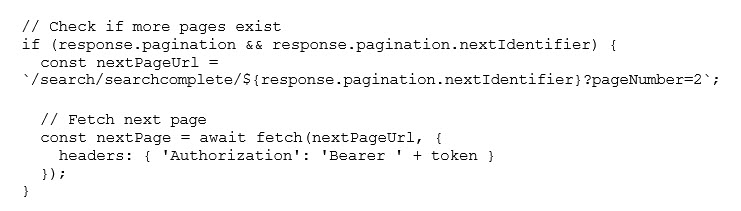
Retrieves additional pages when search results exceed one page. The identifier comes from the pagination object in the initial response.
Authentication
The API uses OAuth 2.0 Bearer tokens. Include your token in the Authorization header:
Important Headers
|
Header |
Required? |
Purpose |
|
XAUTH_TRAVELPORT_ACCESSGROUP |
Yes |
Your access group (equivalent to PCC) |
|
TVP-Trace-Id |
No |
Request tracking identifier |
|
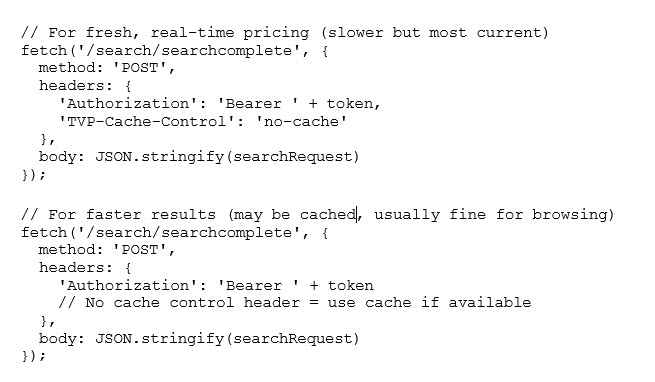
TVP-Cache-Control |
No |
Control caching behavior (e.g., "no-cache") |
|
TVP-Enable-Error-Details |
No |
Get detailed error messages |
Request Object Model
HotelSearchRequest Structure
The request is organized into logical groups:

Key Request Objects
stayDetails (Required)
Purpose: Defines when and for whom you're searching.
Required Fields:
-
checkInDateLocal: Check-in date (YYYY-MM-DD format)
-
checkOutDateLocal: Check-out date (YYYY-MM-DD format)
-
guests: Number and ages of guests
Example:
{
 "stayDetails": {
  "checkInDateLocal": "2025-03-15",
  "checkOutDateLocal": "2025-03-17",
  "guests": {
   "numberOfAdults": 2,
   "numberOfChildren": 1,
   "childAges": [
    5
   ]
  },
  "rooms": 1
 }
}
propertyFilter (Required)
Purpose: Defines which properties to search for and what data to return.
Search By Location:
{
 "propertyFilter": {
  "location": {
   "city": "San Francisco",
   "countryCode": "US"
  },
  "returnOnlyAvailableProperties": true,
  "chainCodes": [
   "HI",
   "MA"
  ],
  "imageSize": "LARGE",
  "returnAllImageURLs": true
 }
}
Search By Property IDs
{
 "propertyFilter": {
  "propertyKeys": [
   "TVPT-12345",
   "TVPT-67890"
  ]
 }
}
Common propertyFilter Options:
-
returnOnlyAvailableProperties: Only return properties with availability
-
chainCodes: Filter by hotel chains (e.g., ["HI", "MA"])
-
categories: Filter by rate categories (e.g., ["CORPORATE", "GOVERNMENT"])
-
hotelNameContains: Partial name match
-
imageSize: Control image dimensions (SMALL, MEDIUM, LARGE)
-
returnRateSummaryInfo: Include rate summary in response
roomFilter (Optional)
Purpose: Filter results by room characteristics. Only rates matching these criteria will be returned.
Example:
{
 "roomFilter": {
  "nonSmoking": true,
  "accessible": false,
  "bedConfiguration": {
   "preferredBedTypes": [
    "KING",
    "QUEEN"
   ]
  },
  "amenityCodes": [
   "WIFI",
   "MINIBAR"
  ]
 }
}
rateFilter (Optional)
Purpose: Filter results by rate characteristics.
Example:
{
 "rateFilter": {
  "rateFlags": {
   "refundable": true,
   "breakfastIncluded": true
  }
 }
}
Response Object Model
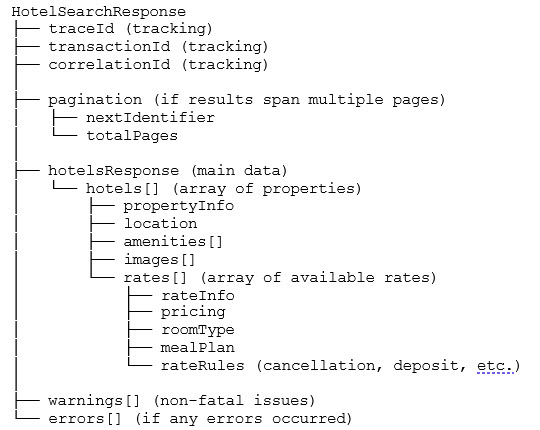
HotelSearchResponse Structure
The response follows this hierarchy:
Key Response Objects
PropertyItem (Hotel Object)
Each hotel in the hotels[] array contains:
propertyKey: Unique identifier (use this for booking)
propertyInfo: Hotel details (name, rating, description)
location: Address and coordinates
amenities: Property amenities (pool, gym, parking, etc.)
images: Property images
rates: Array of available rates (this is what you need for pricing)
Rate Object
Each rate object contains everything you need to display and book:
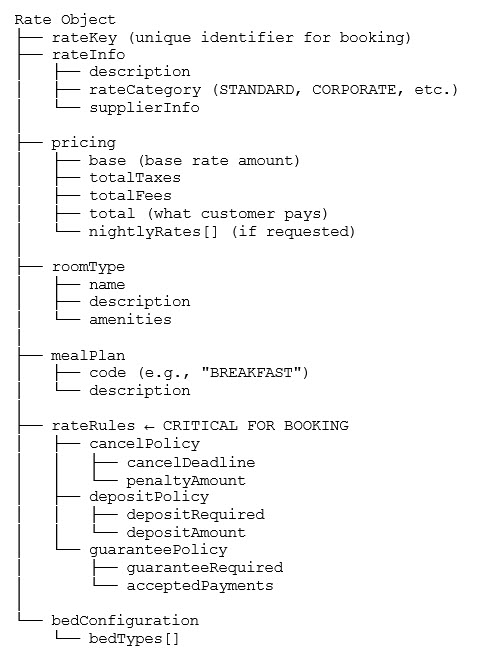
Important: The rateRules object contains all cancellation and payment policies. You MUST display this information to users before booking.
Practical Examples
Example 1: Basic Location Search Request
{
 "stayDetails": {
  "checkInDateLocal": "2025-04-10",
  "checkOutDateLocal": "2025-04-12",
  "guests": {
   "numberOfAdults": 2,
   "numberOfChildren": 0
  }
 },
 "propertyFilter": {
  "location": {
   "city": "Boston",
   "stateProvince": "MA",
   "countryCode": "US"
  },
  "returnOnlyAvailableProperties": true
 },
 "requestedCurrency": "USD"
}
Example 2: Search with Room and Rate Filters Request
{
 "stayDetails": {
  "checkInDateLocal": "2025-05-15",
  "checkOutDateLocal": "2025-05-17",
  "guests": {
   "numberOfAdults": 2,
   "numberOfChildren": 0
  }
 },
 "propertyFilter": {
  "location": {
   "coordinates": {
    "latitude": 37.7749,
    "longitude": -122.4194
   },
   "radiusMiles": 5
  },
  "chainCodes": [
   "HI"
  ],
  "returnOnlyAvailableProperties": true,
  "categories": [
   "CORPORATE"
  ]
 },
 "roomFilter": {
  "nonSmoking": true,
  "bedConfiguration": {
   "preferredBedTypes": [
    "KING"
   ]
  }
 },
 "rateFilter": {
  "rateFlags": {
   "refundable": true
  }
 },
 "requestedCurrency": "USD"
}
Navigating the Response
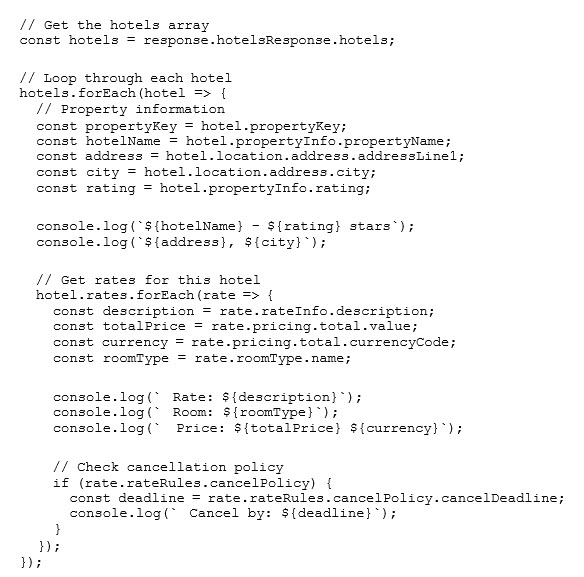
Accessing Hotel Data
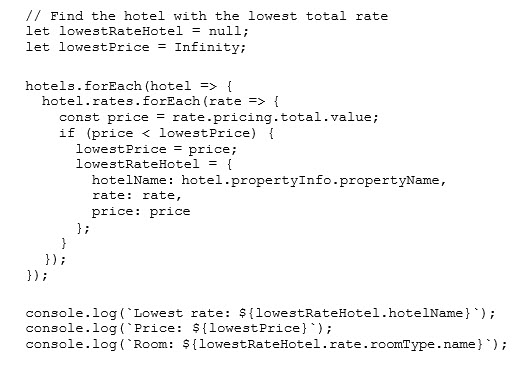
Finding the Lowest Rate
Common Patterns and Tips
Handling Pagination
If your search returns many results, use pagination:
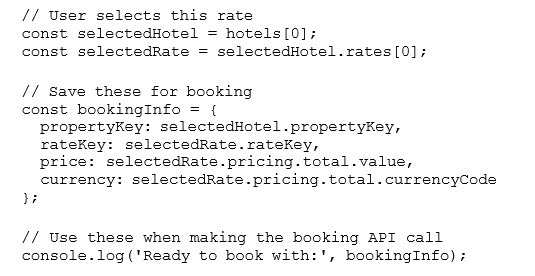
Using Rate Keys for Booking
When a user selects a rate, save both the propertyKey and rateKey:
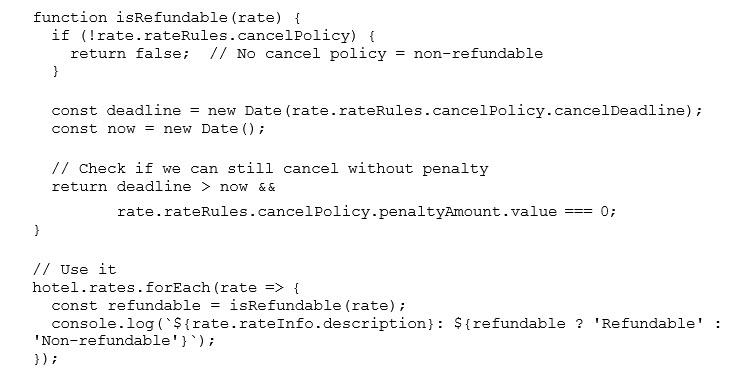
Checking for Refundability
Always check the cancellation policy before displaying rates:
Using Cache Control
Control whether you want cached or fresh results:
Quick Reference
Essential Response Paths
To Get... | Navigate To... |
List of hotels | response.hotelsResponse.hotels[] |
Hotel name | hotel.propertyInfo.propertyName |
Hotel address | hotel.location.address |
Star rating | hotel.propertyInfo.rating |
Available rates | hotel.rates[] |
Rate price | rate.pricing.total.value |
Room type | rate.roomType.name |
Cancellation policy | rate.rateRules.cancelPolicy |
Deposit requirements | rate.rateRules.depositPolicy |
Property ID (for booking) | hotel.propertyKey |
Rate ID (for booking) | rate.rateKey |
Common Mistakes to Avoid
Not checking rateRules: Always check rateRules.cancelPolicy and rateRules.depositPolicy before displaying rates to users. Showing a rate without cancellation details can lead to customer complaints.
Forgetting to filter by availability: Set returnOnlyAvailableProperties: true in propertyFilter unless you want to show properties without available rooms.
Not saving propertyKey and rateKey: You need both identifiers when making a booking. Save them when the user selects a rate.
Ignoring the warnings array: Check response.warnings for non-fatal issues that might affect the results (e.g., some properties didn't respond in time).
Not handling pagination: Large searches may return hundreds of properties. Check response.pagination and implement pagination if needed.
Using cached data for final booking: Before booking, make a fresh search with TVP-Cache-Control: no-cache to get current pricing.
Summary
Key Takeaways:
Request Structure: stayDetails (when/who) + propertyFilter (where) + optional filters (what kind)
Response Structure: hotels[] contains properties, each with rates[], each rate has pricing and rateRules
For Booking: Save propertyKey and rateKey from selected rate
Always Display: Rate rules (cancellation and deposit policies) to users
Cache Control: Use TVP-Cache-Control header to control whether you get cached or fresh data
Pagination: Check response.pagination for additional pages of results
Next Steps:
Review the complete API documentation for all available fields and options
Test with your authentication credentials in a development environment
Implement error handling for network issues and API errors
Build your booking flow using the propertyKey and rateKey from search results
Contact your Travelport account manager for additional support